
|
||
| Network Testing and Emulation Solutions |
|
|
||
| Network Testing and Emulation Solutions |
Background Info:
http://www.smallnetbuilder.com/wireless/wireless-howto/30210-how-to-setting-up-freeradius-for-wpa-a-wpa2-enterprise-part-1?start=1
http://www.zdnet.com/blog/ou/understanding-the-updated-wpa-and-wpa2-standards/67
Freeradius HOW-TOs:
http://deployingradius.com/documents/configuration/pap.html
http://www.smallnetbuilder.com/wireless/wireless-howto/30213-how-to-setting-up-freeradius-for-wpa-a-wpa2-enterprise-part-2
Freeradius Setup NOTES:
Start with the deployingradius.com site to get started: from configuring PAP through creating production certificates. You should have a modified ca.cnf, server.cnf and client.cnf.
Continue setup with the smallnetbuilder site part 2 "Creating the Client and Server Keys" but use the client.cnf and ca.cnf to generate the key pair, sign the certificate and generate the pkcs12 file. See commands below:
cd /etc/raddb/certs

openssl req -new -config client.cnf -keyout client_key.pem -out client_req.pem

openssl ca -config ca.cnf -in client_req.pem  -out client_cert.pem

openssl pkcs12 -export -clcerts -in client_cert.pem -inkey client_key.pem -out client.p12
DO NOT modify the radiusd.conf file. Only need to modify the following files:
/etc/raddb/users - add entry: client Auth-type := EAP
/etc/raddb/sites-enabled/default - comment out the preprocess module
/etc/raddb/eap.conf - set the default_eap_type = tls
/etc/raddb/clients.conf - add stanza for Netgear AP

client 192.168.2.1 {
        secret      =   lanforge
        shortname   =   wireless_ap
        nastype     =   other
}
LANforge Configuration NOTES:
SCP the ca.pem and client.p12 files to the LF wireless emulator for use by wireless clients.
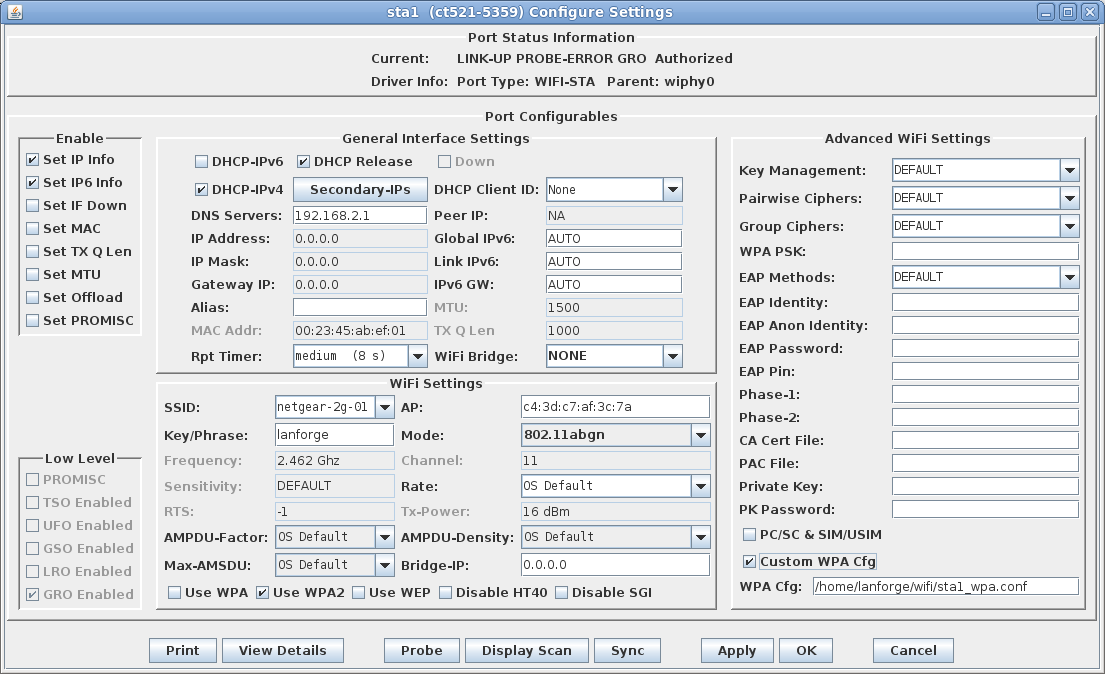
Method 1: Use the LANforge-GUI Modify window to change the wireless station authentication values.

Method 2: Use the LANforge-GUI Modify window to enter a custom wpa supplicant configuration file for the wireless station.
[root@ct521-5359 wifi]# cat sta1_wpa.conf
ctrl_interface=/var/run/wpa_supplicant
fast_reauth=1
can_scan_one=1
min_scan_gap=5
bss_max_count=2000
eapol_version=1
network={
    ssid="netgear-2g-01"
    bssid=c4:3d:c7:af:3c:7a
    disable_ht=0
    disable_ht40=0
    ht_mcs=""
    disable_max_amsdu=-1
    ampdu_factor=-1
    ampdu_density=-1
    proto=RSN
    key_mgmt=WPA-EAP
    #psk="lanforge"
    psk=434cecc6bf8ccf77c84e4946290c095e5326725288249062b2ad07c724b98a30
    eap=TLS
    pairwise=CCMP TKIP
    group=CCMP TKIP
    identity="client"
    password="lanforge"
    ca_cert="/home/lanforge/wifi/ca.pem"
    private_key="/home/lanforge/wifi/client.p12"
    private_key_passwd="lanforge"

}
NOTE: As of LANforge 5.2.6, a custom config file is no longer required. Just
configure the virtual Station interface with the proper settings in the
LANforge-GUI as shown in Method 1 above.
As root, use radiusd -X to start the RADIUS server and monitor output on the radius-server machine.
The virtual stations should automatically associate, acquire a DHCP IP address and be ready to generate and receive traffic.
